


Support Coordinator Portal
EVERY PARTICIPANT. EVERY BUDGET. ONE
SECURE LOGIN.
A clearer view of every participant plan
Manage assigned participants, invoices, funding schedules and forecasts through the Manage Mode Support Coordinator Portal.

01
Manage every participant
Move between assigned participants
without switching accounts or waiting
for reports.
02
Identify risks earlier
See utilisation, scheduled releases and
forecasts before funding concerns
escalate.
03
Review invoices quickly
View processed and pending invoices,
documents and approvals where
authorised.
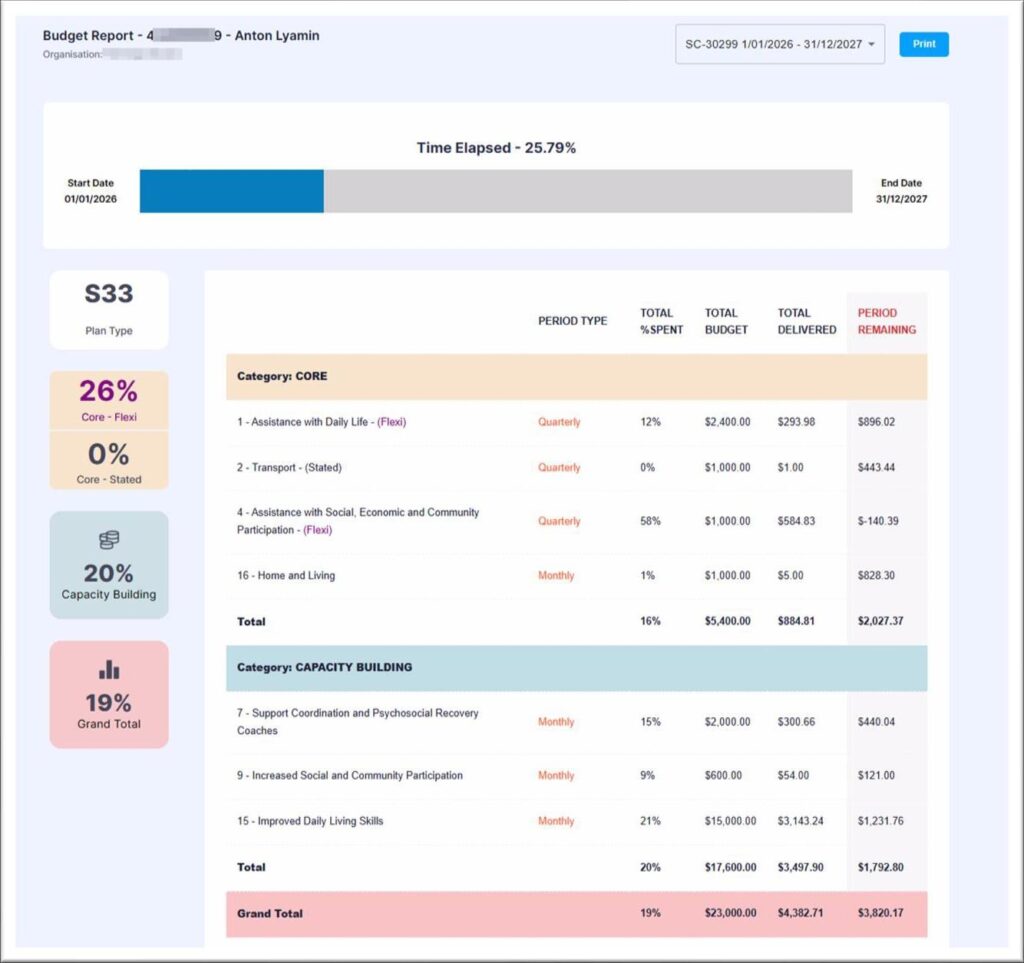
CASELOAD MANAGEMENT
Manage assigned participants from one login
Access participant funding, invoices and reports from
a single secure portal. This makes it easier to identify
plans that need attention and move between
participants efficiently.
- All assigned participants
- Funding summaries and plan dates
- Invoices and approval workflows
- Budget utilisation and funding forecasts
- Participant-level reporting and insights
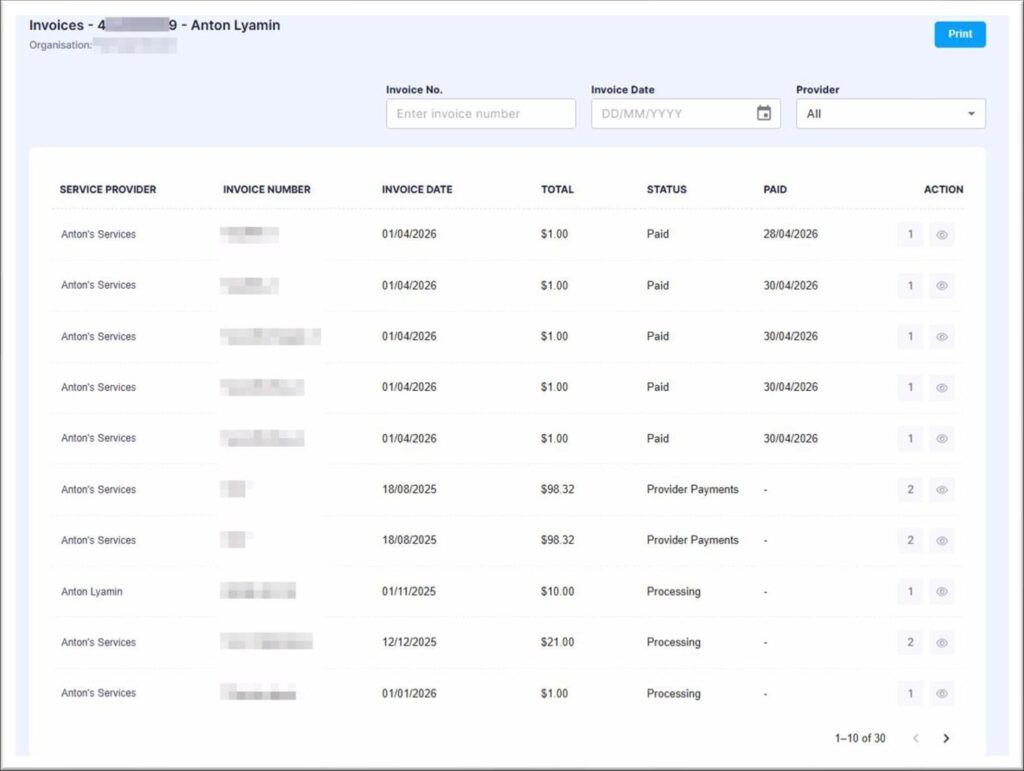
INVOICE MANAGEMENT
Review processed and pending invoices
See what has been claimed against each participant
plan, open supporting documents and approve
invoices directly where your organisation has been
authorised to do so.
- Invoice status and service provider
- Claimed amount and service dates
- Original invoice PDFs and supporting documents
- Funding category allocation for pending invoices
- Direct approval where approval permissions are enabled
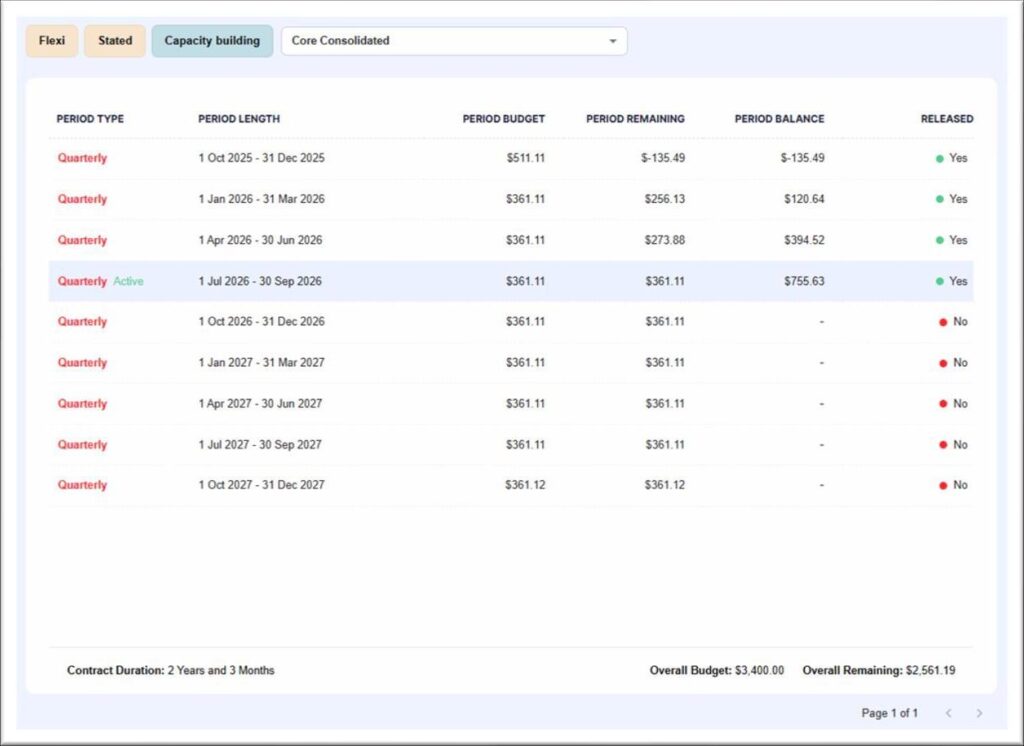
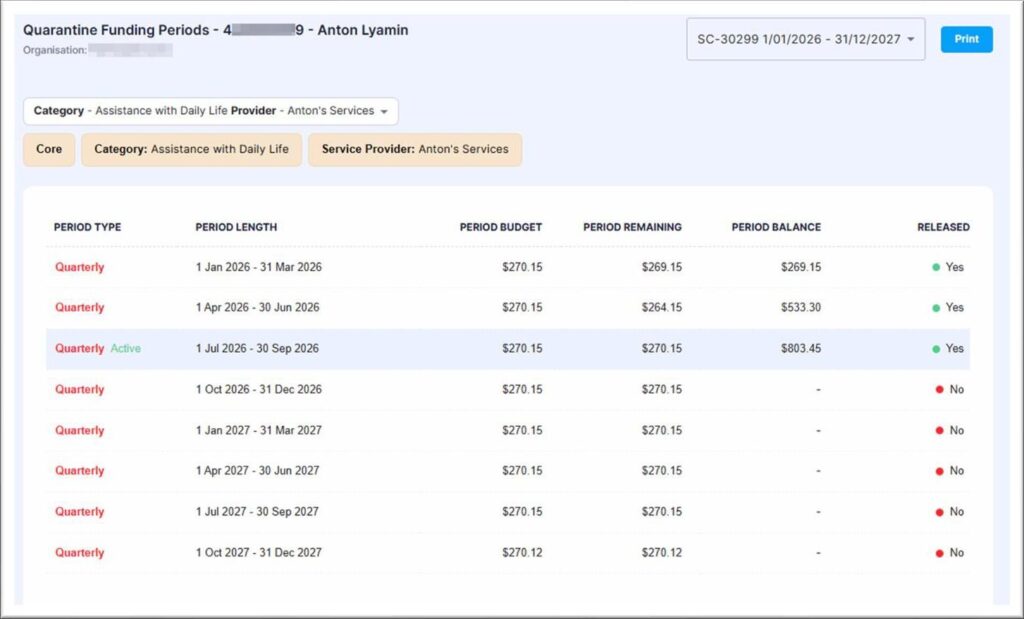
FUNDING SCHEDULES
Track released funding and cumulative availability
For plans with scheduled funding periods, the portal
shows what has been released, what remains in each
period and how unused funding carries forward into
the current cumulative balance.
- Funding released in each period
- Period utilisation and remaining balance
- Cumulative available funding
- CORE Flexible, stated and capacity-building views
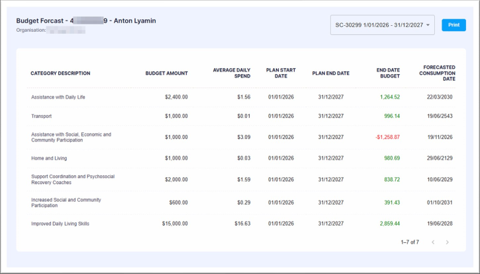
FORECASTING
Spot potential underspend or overspend early
Budget forecasting uses recorded spending patterns
to estimate likely end-of-plan outcomes by category,
giving you more time to discuss emerging risks with
the participant and their support network.
- Average daily spending
- Current utilisation trends
- Projected end-of-plan balances
- Expected underspend or overspend
- Category-specific consumption projections
DETAILED BUDGETS
Monitor provider categories and stated items
Drill into more specific allocations when a participant
has funding reserved for a provider category or a
stated support item.
- Budget allocation and funds utilised
- Remaining balance by category or item
- Funding periods and release status
- Cumulative available funding
- Provider-specific funding visibility
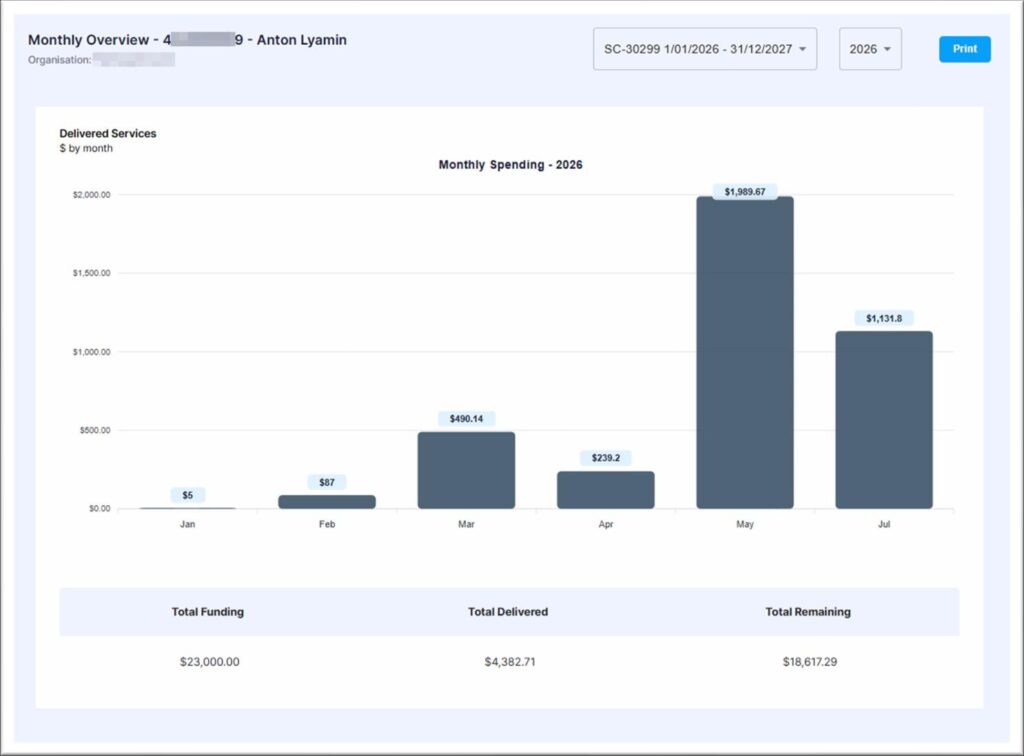
SPENDING TRENDS
Understand monthly activity at a glance
The monthly spending view highlights changes in
delivered supports over time and provides a quick
reference for total funding, total delivered and the
remaining balance.
- Monthly expenditure
- Historical spending patterns
- Funding utilisation trends
- Total delivered and total remaining
SUPPORTING BENEFITS
Spend less time chasing information
One caseload view
Move between assigned participants through a single
secure login.
Current plan information
Review budgets, claims, funding periods and documents
without requesting a separate report.
Proactive oversight
Use cumulative balances and forecasts to identify
funding concerns earlier.
Stronger conversations
Use clear spending and budget information when working
with participants and providers.
SIMPLE ACCESS
How it works
01
Log in securely
Open the Support Coordinator Portal
from the Manage Mode website.
02
Choose a participant
Select the relevant plan, invoice or
reporting view.
03
Review and respond
Approve where authorised, download
information or follow up on an emerging
funding issue.
Frequently Asked Questions
Yes. Assigned participants can be accessed through the same secure portal account.
Direct approval is available only where the appropriate invoice approval permissions have been granted.
Yes. The portal can show released and future funding periods, period balances and cumulative available funding.
Forecasts use recorded spending patterns, including average daily expenditure, to estimate likely end-of-plan outcomes.
They are estimates rather than guarantees.
Where documents are available, original invoice PDFs and supporting files can be opened from the relevant invoice
record.
Make sure Manage Mode is selected as the plan manager at the top of your login.
Give your caseload a clearer view
Log in to review participant funding, invoices and forecasts, or contact Manage Mode if you need help accessing the portal.